Your first virtual assistant Instagram post is more than a “hello”—it’s your chance to position yourself, show off your skills, and connect with potential clients. This post breaks down exactly how to create a high-converting intro carousel that tells your story slide-by-slide. You’ll learn what to say, how to structure it, and how to confidently show up (even if you’re brand new). If you’re ready to make a strong first impression on Instagram as a VA, this guide walks you through it.
Table of Contents
Let’s be real — your first Instagram post as a virtual assistant isn’t just a hello. It’s your moment to position yourself as a pro, connect with your ideal clients, and tell people exactly what you’re about.
But here’s where a lot of new VAs get stuck:
“Do I just post a selfie and say hi?”
“How much info is too much?”
“Should I be funny? Polished? Professional? Personal?”
Instead of trying to cram everything into a single caption or graphic, let’s use a carousel. It’s one of the best tools for storytelling and engagement on Instagram. You can guide your reader through your story — slide by slide — and get them to want to keep swiping.
Here’s exactly what to put in your virtual assistant Instagram introduction carousel 👇
What to Include in Your Carousel Intro Post (Slide by Slide)
📸 Slide 1: The Hook
Think scroll-stopping headline here — bold, clear, and benefits-focused.
“Meet the Virtual Assistant Who Helps Coaches Get Their Time (and Sanity) Back”
Use a branded photo of yourself or a clean, on-brand graphic. Your goal: stop the scroll and spark curiosity.
🧠 Slide 2: Who You Are (Briefly)
This is your “about me” in 1–2 sentences. Keep it high-impact and personal.
“I’m Jen, a virtual assistant + systems coach for online business owners who are tired of juggling all the things on their own.”
💻 Slide 3: What You Do (Specifically)
This is where you share your skills — what you’re good at, what you want to be hired for, and how you help. Whether you’ve worked with 10 clients or zero, you can position yourself clearly and confidently.
✅ If you have client experience:
“I specialize in setting up email automation, streamlining backend workflows, and making my clients’ lives 10x easier.”
🆕 If you’re just starting out:
“I’m a trained virtual assistant focused on helping coaches and creatives organize their backend systems, manage their inboxes, and create more time for the work they actually love.”
Or…
“I’m new to the VA space but not new to getting things done. I’ve built up skills in project management, customer service, and content scheduling — and I’m ready to support busy entrepreneurs with the behind-the-scenes tasks they’re ready to delegate.”
💡 Optional bullet list format (especially good for carousels):
Inbox + calendar management
Client onboarding systems
Weekly content scheduling
Admin support + systems setup
SOP creation & organization
👉 The goal is to sound capable and focused — not “aspiring.” Don’t apologize for being new. Lean into what you can do and the kind of support you’re excited to provide.
💡 Slide 4: Own Your Newness (If You’re Brand New)
Everyone starts somewhere. And when you own it — confidently — you instantly build trust.
“I may be new to the VA space, but I bring serious organization, quick learning, and full-on reliability to every task I take on. I’m here to support your business like it’s my own.”
This shows potential clients you’re grounded, not green.
✨ Slide 5: Why You Do It
Your “why” makes you memorable. Keep it personal without oversharing.
“After leaving my 9–5 and building this business during nap times, I realized I could help others do the same — and love their business again.”
That connection piece is powerful.
💬 Slide 6: Invite Connection
You’re not just telling your story — you’re inviting your audience into it.
“New here? Tell me what kind of biz you run 👇 or DM me if you’re ready to stop drowning in admin tasks!”
Simple. Direct. Human.
💾 Optional Slide 7: Give Something Valuable
This is your bonus value bomb. A quick win or tip that makes someone want to follow and save your post.
“🔥 Pro Tip: If your Dubsado inbox makes you want to scream, create a ‘quick reply’ template for common responses — or ask me for mine!”
This shows you’re not just another VA — you’re a resource.
Stuck on what to call yourself?
Stop staring at a blank screen wondering if you sound professional enough to be a virtual assistant!
The 5-Day VA Brand Challenge walks you through picking your business name, colors, fonts, and vibe – so you can skip the overthinking and actually get started!
When I posted my own reintroduction carousel, I made sure to:
Be specific about my services
Show up with a clear voice and vibe
Invite conversation, not just likes
It booked me a discovery call the next day. Not because it was perfect, but because it was clear, authentic, and useful.
Final Thoughts + Quick Challenge ✨
Your introduction post is your Instagram first impression — and a carousel gives you the space to really show people who you are, what you do, and how you can help.
So here’s your challenge: Create your intro carousel using the slide breakdown above. Don’t wait until it feels perfect. Start with what you know, speak from your strengths, and just be you.
Then? DM me when it’s live (@heyjenniferkay on Instagram). I’ll cheer you on — and if it’s 🔥, you better believe I’ll be sharing it too!
Share This Post:
Email
Facebook
Pinterest
Twitter
You might also like...
Think email marketing is outdated? Think again. Building an email list is one of the most powerful ways to land consistent VA clients without chasing them on social media. This post breaks down exactly how to start, grow, and use your email list to fill your calendar with dream clients!
Pitching yourself as a virtual assistant shouldn’t feel gross or pushy. But if you’re staring at a blank email wondering how to sound professional without sounding like a used car salesman, you’re not alone. This post gives you the exact framework (and copy-paste templates) to pitch your VA services confidently—without the ick factor!
Struggling to keep track of client projects, deadlines, and your own to-do list? You need a project management tool that actually works for VA life. This post breaks down the best options (ClickUp, Asana, Trello, Monday.com, and more), what each one does well, and how to pick the right one for your business.
Wondering where to find virtual assistant clients when you’re just starting out? Forget job boards that pay $5/hour. This post breaks down 5 real places to find quality clients who actually pay what you’re worth—from Facebook groups to warm outreach. You’ll walk away with a game plan to land your first (or next) client!
Tired of competing on price as a general VA? Specializing as a virtual assistant lets you charge package rates, attract better clients, and actually scale your business. This post breaks down the best specializations to consider, how to learn the skills, and how to position yourself as an expert—even if you’re brand new!
Is being a virtual assistant worth it? If you want flexibility and real income without leaving your house, yes. But it’s not all laptop-on-the-beach vibes. This post breaks down the honest pros, the real cons, and who this career is (and isn’t) perfect for. You’ll walk away knowing if the VA life is your next move.
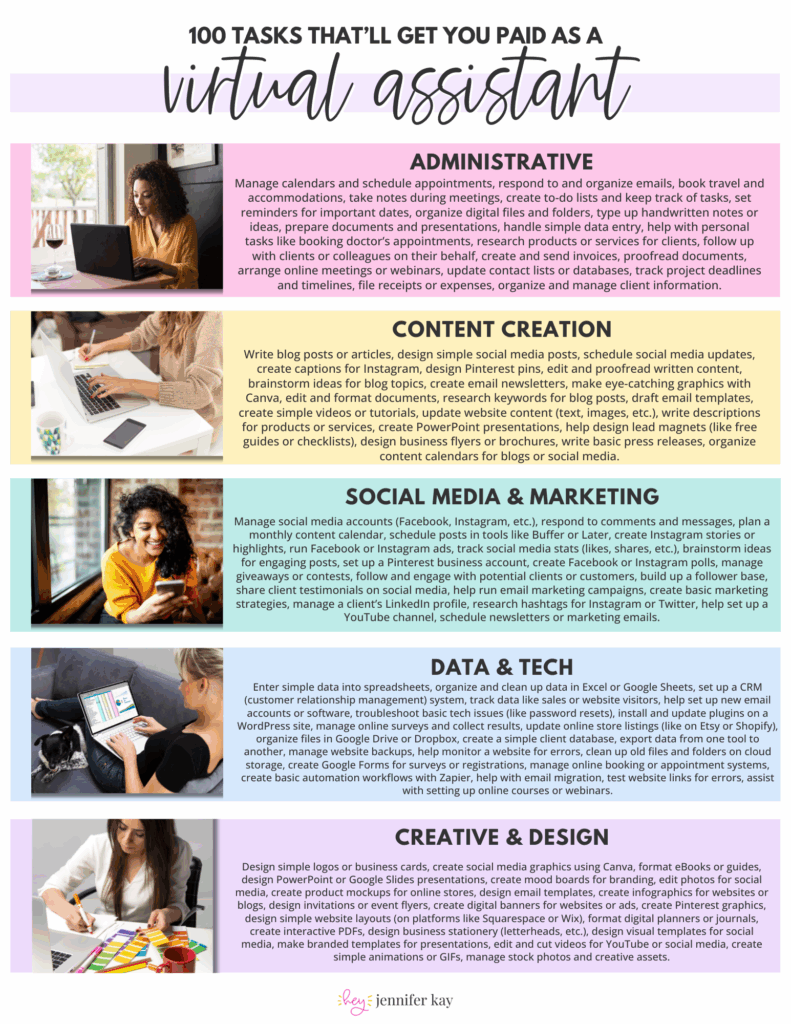
 100 Tasks VAs are Getting Paid to Do –