Let’s be real—your virtual assistant branding might be the reason clients aren’t biting. In this post, we’ll fix that. I’m breaking down how to build a brand that actually attracts dream clients (not just lurkers). You’ll learn how to define your vibe, polish your online presence, and position yourself as the go-to VA—without overthinking every color or Canva graphic.
Table of Contents
If you’re out here hustling for VA clients but hearing crickets, let me ask you a hard question:
Does your brand actually make people want to hire you?
Oof. I know. That one stings.
But here’s the thing—people hire brands, not random service providers. If your virtual assistant branding looks like an afterthought (or worse, non-existent), you’re blending into the sea of VAs instead of standing out as a must-hire pro.
But don’t worry – We’re about to fix that!
By the end of this post, you’ll know exactly how to build a brand that makes clients say, “OMG, I NEED HER.”
Step 1: Define Your Virtual Assistant Branding Strategy
Before you start picking colors or slapping together a logo, let’s get clear on who you are and what you do (because THAT is your brand).
Ask yourself these questions: ✔️ Who is your dream client? (Coaches? Small business owners? Course creators?) ✔️ What’s your secret sauce? (Tech wizard? Organization queen? Social media genius?) ✔️ How do you want people to feel when they see your brand? (Chill? High-end? Fun?)
These answers matter because your virtual assistant branding should reflect your personality and attract your ideal client.
💡 ACTION STEP: Write down three words that describe your brand vibe.
For example: “Creative, modern, and professional” OR “Chill, reliable, and fun.”
That’s the foundation of your brand.
Step 2: Create a Brand That Looks Legit (Without Overcomplicating It)
Your Logo & Brand Colors
Logo: Keep virtual assistant branding simple and clean. Canva has great text-based logo templates that don’t look like they were made in 30 seconds (even if they were 😉).Brand Colors: Pick 2-3 colors and use them everywhere. Think cohesion, not chaos.
💡 ACTION STEP: Choose a main color, an accent color, and a neutral (ex: blue, coral, and white).
Your Bio (AKA: How You Introduce Yourself Like a Pro)
If someone asked, “So, what do you do?” and you fumble over your words, your branding needs work.
You need a clear, polished bio that makes people immediately understand what you do and why you’re awesome at it.
💡 Example Bio: “I’m a Virtual Assistant specializing in [your niche]. I help [ideal client] with [specific services] so they can [achieve goal].”
🚀 Example for a Social Media VA: “I’m a Virtual Assistant helping online coaches stay consistent on Instagram, so they can grow their audience (without spending hours on content creation).”
Now THAT is clear.
Your Website or Portfolio (Yes, You Need One)
No, you don’t need a fancy website. But you do need a professional place where people can learn about you.
This can be: ✅ A simple one-page website ✅ A Canva portfolio ✅ A LinkedIn profile with your services listed
Your online presence should include: ✔️ Who you are & what you do ✔️ The services you offer ✔️ How to contact you
💡 ACTION STEP: If you don’t have a website yet, start with a one-page site in Canva that showcases your services and has a “Book a Call” button.
Step 3: Optimize Your Social Media for Virtual Assistant Branding
If a potential client finds your Instagram, do they immediately know what you do? Or do they have to scroll through dog pics and latte art to figure it out?
Let’s fix that.
Update Your Instagram & LinkedIn
Bio: Make it crystal clear. Example → “VA for course creators | Tech & admin support | DM to chat”
Profile Pic: Use a clear, professional (but not stiff) photo.
Content Strategy: Post valuable tips that position you as an expert.
💡 ACTION STEP: Post ONE value-packed post this week. Here are some easy ideas:
📌 “3 Productivity Hacks for Busy Business Owners” 📌 “The #1 Mistake Business Owners Make When Hiring a VA” 📌 “A Day in the Life of a Virtual Assistant”
Make your content helpful and engaging, and people will start paying attention.
Step 4: Position Yourself as a High-Value VA (So You Can Charge More)
If your virtual assistant branding screams “affordable” instead of “high-value”, you’re going to attract clients who expect bargain bin prices. No thanks.
Here’s how to brand yourself as premium:
✔️ Talk with confidence – Stop saying “I’m just a VA” and start owning your expertise. ✔️ Showcase wins – Share client testimonials, before-and-afters, or case studies. ✔️ Create a smooth client experience – Have professional-looking onboarding docs, contracts, and invoices ready to go.
💡 ACTION STEP: Write out your client process so it looks polished. Example:
1️⃣ Inquiry Call → 15-minute chat to see if we’re a fit 2️⃣ Onboarding → Contract, invoice, and welcome guide 3️⃣ First Month Plan → Personalized workflow to get started
Now THAT feels professional.
Stuck on what to call yourself?
Stop staring at a blank screen wondering if you sound professional enough to be a virtual assistant!
The 5-Day VA Brand Challenge walks you through picking your business name, colors, fonts, and vibe – so you can skip the overthinking and actually get started!
If you want to charge premium rates and work with dream clients, your virtual assistant branding HAS to reflect that.
No more inconsistent messaging or slapped-together branding—it’s time to show up like the in-demand, booked-out VA you are.
💡 Your Next Steps: 1️⃣ Pick your brand vibe (What 3 words describe your business?) 2️⃣ Update your bio & social media so people instantly know what you do 3️⃣ Create a simple, professional website or portfolio
Do these three things, and your virtual assistant branding will start attracting high-quality clients who are actually excited to pay you.
Now tell me—what’s one thing you need to improve about your virtual assistant branding? Drop a comment below and let’s chat!
Share This Post:
Email
Facebook
Pinterest
Twitter
You might also like...
Think email marketing is outdated? Think again. Building an email list is one of the most powerful ways to land consistent VA clients without chasing them on social media. This post breaks down exactly how to start, grow, and use your email list to fill your calendar with dream clients!
Pitching yourself as a virtual assistant shouldn’t feel gross or pushy. But if you’re staring at a blank email wondering how to sound professional without sounding like a used car salesman, you’re not alone. This post gives you the exact framework (and copy-paste templates) to pitch your VA services confidently—without the ick factor!
Struggling to keep track of client projects, deadlines, and your own to-do list? You need a project management tool that actually works for VA life. This post breaks down the best options (ClickUp, Asana, Trello, Monday.com, and more), what each one does well, and how to pick the right one for your business.
Wondering where to find virtual assistant clients when you’re just starting out? Forget job boards that pay $5/hour. This post breaks down 5 real places to find quality clients who actually pay what you’re worth—from Facebook groups to warm outreach. You’ll walk away with a game plan to land your first (or next) client!
Tired of competing on price as a general VA? Specializing as a virtual assistant lets you charge package rates, attract better clients, and actually scale your business. This post breaks down the best specializations to consider, how to learn the skills, and how to position yourself as an expert—even if you’re brand new!
Is being a virtual assistant worth it? If you want flexibility and real income without leaving your house, yes. But it’s not all laptop-on-the-beach vibes. This post breaks down the honest pros, the real cons, and who this career is (and isn’t) perfect for. You’ll walk away knowing if the VA life is your next move.
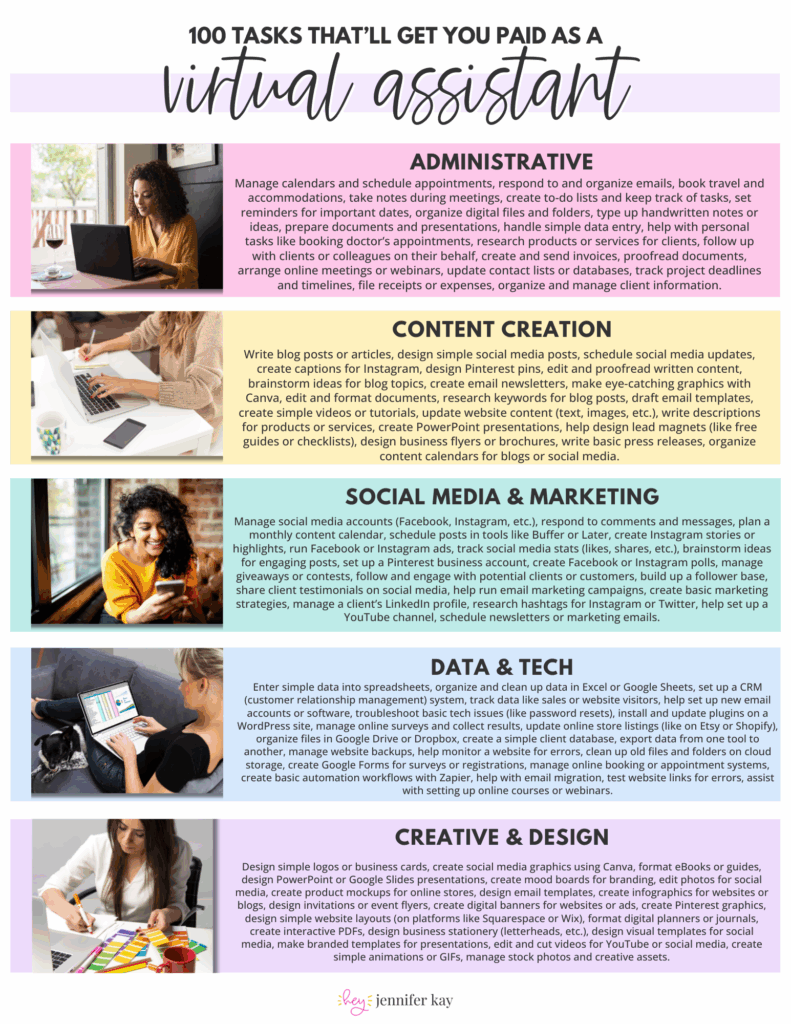
 100 Tasks VAs are Getting Paid to Do –