Feeling overwhelmed by all the tech? This post breaks down the must-have tools for virtual assistants—the essential platforms that help you stay organized, look professional, and save time. From project management and time tracking to design and client communication, you’ll get a peek at the exact tools I use in my VA business daily. If you’re just getting started, this guide will help you set up your business with confidence—minus the tech headache.
Table of Contents
Starting as a Virtual Assistant can feel like you’re standing in the middle of a tech tornado—so many tools, so little time! But here’s the thing: you don’t need a million apps or complicated systems to look like a pro. You just need the right tools that actually make your life easier (and keep you from losing your mind).
When I launched my VA business, I was all about working smarter, not harder. And after a lot of trial and error (and way too many browser tabs open), I found a handful of tools that saved me time, kept me organized, and made me look polished and professional—right from the start.
So, if you’re feeling overwhelmed by all the tech out there, take a deep breath. I’m about to share the must-have tools for virtual assistants I use every day in my own VA business, along with real tips on how they’ll save you time and sanity.
Why the Right Tools Matter for New Virtual Assistants
When you’re just getting started, the last thing you need is a dozen complicated tools to manage. I’ve been there—spinning my wheels, trying every “productivity hack” out there. But the truth is, using the right tools can be the difference between feeling on top of your game and feeling completely overwhelmed.
The right tools help you:
Stay Organized: No more sticky notes and scattered spreadsheets.
Boost Productivity: Less time managing tasks, more time getting stuff done.
Look Professional: Clients notice when you’re organized and on top of things.
And the best part? You don’t need to spend a fortune or have a tech degree to use them. Here are my tried-and-true favorites that keep my business running smoothly every day.
1. ClickUp – Project Management & Organization
If you’re juggling multiple clients and tasks, ClickUp is a lifesaver. It’s like having a digital command center where you can organize every little detail without losing track of a thing.
Why ClickUp is a Must-Have for Virtual Assistants:
All-in-One Organization: Manage tasks, deadlines, and client projects all in one place.
Recurring Tasks: This is my secret weapon for staying on top of my weekly and monthly to-dos. I love using the recurring task feature because once I set my tasks, they automatically regenerate at the set interval. No more re-entering the same tasks every week—ClickUp does the heavy lifting for me.
Customizable Views: Whether you’re a list lover, a visual board person, or a calendar fanatic, ClickUp lets you see your tasks in the way that works best for you.
How I Use ClickUp:
I set up recurring tasks for all my routine client work. Every Monday morning, my list of weekly tasks is already waiting for me—no need to spend time planning or remembering what’s due. This keeps me organized and saves me a ton of mental energy. Plus, my clients think I’m super organized (because, well, I am).
2. Toggl – Time Tracking & Productivity
Raise your hand if you’ve ever sat down to work, only to realize two hours later that you’ve been scrolling Instagram. Been there, done that. That’s where Toggl comes in.
Why Toggl is a Must-Have for Virtual Assistants:
Time Tracking Made Easy: Toggl lets you track exactly how much time you’re spending on each task or client project.
Accountability and Focus: Having a timer running keeps me focused and less likely to get distracted. It’s like a little accountability buddy, nudging me to stay on track.
Accurate Billing: No more guessing how long tasks take—you’ll have exact numbers to show your clients (and justify your rates).
How I Use Toggl:
I set up different projects for each client and start the timer whenever I begin a task. It’s eye-opening to see where my time goes, and it’s helped me realize which tasks take longer than expected. Plus, knowing that the clock is ticking keeps me focused—no more aimless internet browsing!
3. HoneyBook – Client Communication & Contracts
If you want to look like a pro from Day One, HoneyBook is the way to go. It’s an all-in-one client management system that keeps your communication organized and makes you look polished and professional.
Why HoneyBook is a Must-Have for Virtual Assistants:
Streamlined Onboarding: Send proposals, contracts, and invoices in one place. It keeps the onboarding process smooth and professional.
Automated Workflows: Save time by automating follow-ups and reminders—so nothing slips through the cracks.
All-In-One Communication: Keeps all client emails, messages, and files in one organized place. No more hunting through your inbox for that one email.
How I Use HoneyBook:
I send all my proposals, contracts, and invoices through HoneyBook, making the whole client onboarding process super smooth. Plus, it’s so much more professional than sending documents as email attachments. Clients love it, and it makes me look super organized.
4. Canva – Design & Branding
Even if you’re not a graphic designer, Canva is a game-changer for creating social media graphics, client presentations, and branded documents that look like a million bucks.
Why Canva is a Must-Have for Virtual Assistants:
Easy to Use: No design skills? No problem. Canva’s drag-and-drop editor makes it easy to create stunning graphics.
Professional Templates: From social media posts to client proposals, Canva has beautiful templates that are easy to customize.
Consistent Branding: Keeps your branding cohesive across all your online platforms, making you look polished and professional.
How I Use Canva:
I use Canva for everything—from Instagram graphics to client presentations. It’s my go-to for creating branded, professional-looking visuals without spending hours on design. Plus, clients are always impressed with the high-quality graphics I deliver.
5. Google Drive – File Organization & Collaboration
When you’re working virtually, keeping your files organized and easily accessible is a must. Google Drive makes it a breeze.
Why Google Drive is a Must-Have for Virtual Assistants:
Cloud Storage: Access your files from anywhere, on any device.
Easy Collaboration: Share documents with clients and collaborate in real time.
File Organization: Organize your files into folders and subfolders, so you’re never hunting for that one document again.
How I Use Google Drive:
I keep all my client files organized in Google Drive, with separate folders for each project. It keeps me organized and makes sharing files with clients a breeze. They love how easy it is to access everything, and I love how tidy and organized my digital workspace stays.
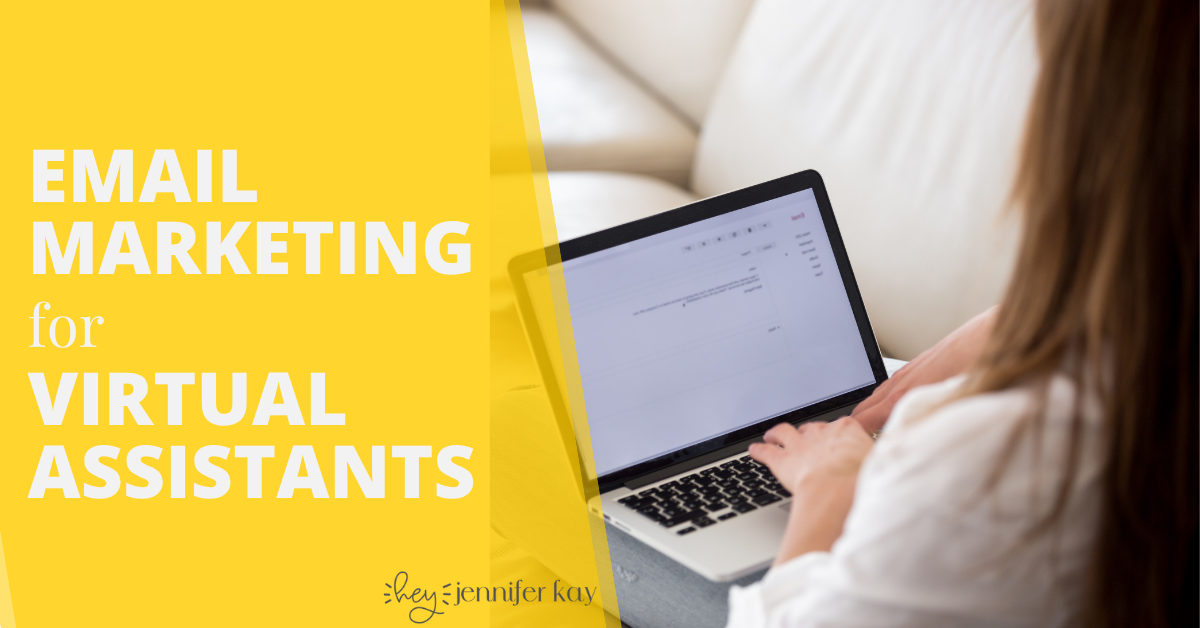
“But what would I even do as a VA?”
Glad you asked—here’s 100 legit tasks you could start today! No fluff, no filler. Just real-deal services clients are hiring for right now. Warning: reading this list might make you realize you’re way more qualified than you thought.
Final Thoughts: Start with the Basics and Build from There
When you’re just getting started as a Virtual Assistant, it’s easy to feel like you need every shiny new tool out there. But the truth is, you only need a few essentials to get organized, stay productive, and look professional.
Start with these must-have tools, get comfortable using them, and then add more as your business grows. These are the tools that helped me go from zero to my first $1,500/month client in just two weeks. They can do the same for you.
Ready to launch your VA business the right way? Check out my 14-Days to VA Roadmap and get the exact steps I used to start my VA business from scratch!
Share This Post:
Email
Facebook
Pinterest
Twitter
You might also like...
Think email marketing is outdated? Think again. Building an email list is one of the most powerful ways to land consistent VA clients without chasing them on social media. This post breaks down exactly how to start, grow, and use your email list to fill your calendar with dream clients!
Pitching yourself as a virtual assistant shouldn’t feel gross or pushy. But if you’re staring at a blank email wondering how to sound professional without sounding like a used car salesman, you’re not alone. This post gives you the exact framework (and copy-paste templates) to pitch your VA services confidently—without the ick factor!
Struggling to keep track of client projects, deadlines, and your own to-do list? You need a project management tool that actually works for VA life. This post breaks down the best options (ClickUp, Asana, Trello, Monday.com, and more), what each one does well, and how to pick the right one for your business.
Wondering where to find virtual assistant clients when you’re just starting out? Forget job boards that pay $5/hour. This post breaks down 5 real places to find quality clients who actually pay what you’re worth—from Facebook groups to warm outreach. You’ll walk away with a game plan to land your first (or next) client!
Tired of competing on price as a general VA? Specializing as a virtual assistant lets you charge package rates, attract better clients, and actually scale your business. This post breaks down the best specializations to consider, how to learn the skills, and how to position yourself as an expert—even if you’re brand new!
Is being a virtual assistant worth it? If you want flexibility and real income without leaving your house, yes. But it’s not all laptop-on-the-beach vibes. This post breaks down the honest pros, the real cons, and who this career is (and isn’t) perfect for. You’ll walk away knowing if the VA life is your next move.
 100 Tasks VAs are Getting Paid to Do –