Wondering which email automation tools are best for Virtual Assistants? In this post, I’m sharing the top email automation tools VAs should know—plus who they’re best for, what makes them stand out, and how you can use them to deliver serious results for your clients.
Table of Contents
So, you know that email automation is a must-have skill for Virtual Assistants. You also know which workflows businesses actually need (if not, check out this post on essential email workflows).
Now, let’s talk about the email automation tools that make all of this happen.
Because here’s the deal: Setting up email automation isn’t hard… when you’re using the right platform. The tricky part? There are a million options out there, and not all of them are beginner-friendly (or worth your time).
I’ve tested a ton of platforms over the years, and today, I’m breaking down the best email automation tools for Virtual Assistants—so you can confidently choose the right one and start offering this as a service.
1. Flodesk – The “Easy & Beautiful” Option
✅ Best for: Coaches, creatives, and small business owners who want stunning emails without the tech headache. ✅ Why It’s Great: Super easy to use, affordable, and the emails look gorgeous. ✅ How You’d Use It as a VA: Set up welcome sequences, nurture sequences, and sales funnels for solopreneurs who want automated, on-brand communication.
💡 Pro Tip: Flodesk doesn’t have super advanced automation, but for simple, high-converting sequences, it’s a dream.
2. Kit (formerly ConvertKit) – The “Creator’s Choice”
✅ Best for: Bloggers, course creators, and digital product sellers. ✅ Why It’s Great: Powerful automation features, great for tagging and segmenting subscribers. ✅ How You’d Use It as a VA: Help creators set up automated funnels that nurture their audience and promote their offers.
💡 Pro Tip: If your client sells digital products or courses, Kit makes it easy to track who engages with what content and send hyper-targeted emails.
3. HoneyBook – The “Service-Based Business Hub”
✅ Best for: Freelancers, consultants, and service providers who need both email automation and client management. ✅ Why It’s Great: Combines email automation with contracts, invoices, and scheduling in one place. ✅ How You’d Use It as a VA: Set up automated client onboarding, contract signing reminders, and follow-up emails.
💡 Pro Tip: If your clients are service-based business owners (like designers, coaches, or photographers), HoneyBook keeps their entire workflow organized.
4. ActiveCampaign – The “Advanced Powerhouse”
✅ Best for: E-commerce stores and businesses that need serious automation. ✅ Why It’s Great: Extremely advanced automation and CRM capabilities. ✅ How You’d Use It as a VA: Set up detailed email sequences, automate lead scoring, and help businesses track customer behavior.
💡 Pro Tip: Most small businesses don’t need something this robust, but if you work with a bigger brand, ActiveCampaign is next-level.
Which Email Automation Tool Should You Start With?
If you’re new to email automation and want to offer this as a service, start with Flodesk or Kit. They’re simple, powerful, and widely used by coaches, course creators, and online business owners (aka, great potential clients for you!).
Want to support service-based businesses (like designers, wedding planners, or photographers)? Then HoneyBook is your best bet.
Once you feel comfortable, you can branch out into more advanced tools like ActiveCampaign—where businesses will pay a premium for your expertise.
What’s Next? How to Package & Price Email Automation as a VA
Now that you know which tools to use, let’s talk about how to turn this into a paid service. In my next post, I’ll break down exactly how to package and price email automation as a Virtual Assistant—so you can start charging premium rates for it.
NEXT POST COMING SOON…
Share This Post:
Email
Facebook
Pinterest
Twitter
You might also like...
Think email marketing is outdated? Think again. Building an email list is one of the most powerful ways to land consistent VA clients without chasing them on social media. This post breaks down exactly how to start, grow, and use your email list to fill your calendar with dream clients!
Pitching yourself as a virtual assistant shouldn’t feel gross or pushy. But if you’re staring at a blank email wondering how to sound professional without sounding like a used car salesman, you’re not alone. This post gives you the exact framework (and copy-paste templates) to pitch your VA services confidently—without the ick factor!
Struggling to keep track of client projects, deadlines, and your own to-do list? You need a project management tool that actually works for VA life. This post breaks down the best options (ClickUp, Asana, Trello, Monday.com, and more), what each one does well, and how to pick the right one for your business.
Wondering where to find virtual assistant clients when you’re just starting out? Forget job boards that pay $5/hour. This post breaks down 5 real places to find quality clients who actually pay what you’re worth—from Facebook groups to warm outreach. You’ll walk away with a game plan to land your first (or next) client!
Tired of competing on price as a general VA? Specializing as a virtual assistant lets you charge package rates, attract better clients, and actually scale your business. This post breaks down the best specializations to consider, how to learn the skills, and how to position yourself as an expert—even if you’re brand new!
Is being a virtual assistant worth it? If you want flexibility and real income without leaving your house, yes. But it’s not all laptop-on-the-beach vibes. This post breaks down the honest pros, the real cons, and who this career is (and isn’t) perfect for. You’ll walk away knowing if the VA life is your next move.
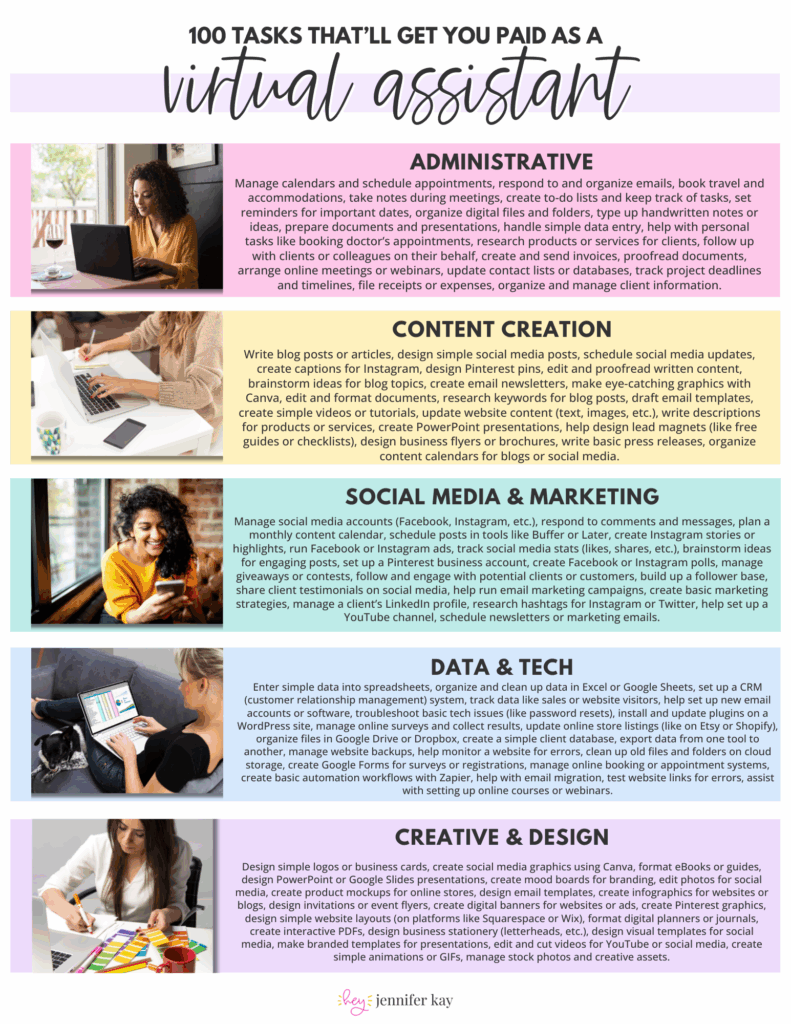
 100 Tasks VAs are Getting Paid to Do –