Wondering if AI is coming for virtual assistant jobs? In this post, we’ll break down why AI isn’t replacing VAs—but why learning to use AI might be the smartest move you can make. Let’s talk strategy, tools, and how to stay ahead of the curve.
Table of Contents
Can AI Replace Virtual Assistants? Here’s the Truth
If you’ve been wondering, “Can AI replace virtual assistants?”—you’re not alone. With ChatGPT writing emails, Zapier connecting apps, and Notion summarizing entire meetings in seconds, it’s easy to feel like the ground is shifting.
But here’s the truth:
👉 AI won’t replace virtual assistants— But VAs who understand AI will absolutely replace the ones who don’t.
Clients are not looking to hire robots. They want real humans who bring emotional intelligence, strategy, and systems—but they also expect faster results, better tools, and tech-savvy support.
And if you’re the VA who can show up with a smart automation before they even think to ask for it? You’ve just positioned yourself as irreplaceable.
Why Your Clients Are Hoping You Learn AI (Soon)
They may not say it out loud, but here’s what clients are thinking:
“Can we stop doing this manually?”
“There has to be a faster way.”
“I’d love it if my VA could streamline this for me.”
When you can walk into a client’s business and say:
“We could automate that entire process in 3 steps using Zapier—want me to handle it?” You instantly elevate yourself from helper to operations partner.
Specific Ways to Impress Clients With AI Right Now
Let’s make this actionable. Here’s exactly what VAs are doing today with AI:
Create Content in Half the Time
Use ChatGPT to draft a blog post outline, then refine it to match your client’s voice.
Bonus: Suggest headline options and meta descriptions too—clients will think you’re magic.
Build a Lead Capture Workflow in Zapier
Trigger: A lead fills out a Typeform Action: Zapier sends a personalized email, adds them to a Notion CRM, and creates a task in ClickUp.
Client reaction: “I didn’t know this was even possible—thank you!”
Summarize Meetings in Minutes
Upload a Zoom transcript to Notion AI and say:
“Summarize this into 5 bullet points + next steps for each team member.”
Deliver the recap in under 10 minutes.
Your Competitive Advantage Is You—But AI Is Your Power Tool
AI can’t:
Know your client’s tone and communication style
Navigate sensitive conversations
Prioritize based on business context
Spot inefficiencies they don’t even know they have
You can. AI just helps you do it faster.
Stop trying to piece together how to become a VA from free YouTube videos!
VA Launch Academy gives you the complete system to launch your virtual assistant business: what services to offer, how to price them, where to find clients, what to say when you pitch, and how to onboard them when they say yes. Plus live support and a community that actually gets it!
This isn’t just a list of one-size-fits-all prompts. Inside, you’ll get:
✅ 150+ detailed, customizable AI prompts tailored for VAs
✅ A step-by-step guide to using AI effectively (and authentically)
✅ Real-world use cases for content, communication, and daily tasks
✅ Tips to keep your AI-generated work on-brand and high-quality
Whether you’re writing social posts, drafting client emails, or just tired of staring at a blank screen—this guide helps you save time, improve results, and show up like a pro.
👉 Get the guide here and start using AI to boost your efficiency without losing your personal touch!
Share This Post:
Email
Facebook
Pinterest
Twitter
You might also like...
Think email marketing is outdated? Think again. Building an email list is one of the most powerful ways to land consistent VA clients without chasing them on social media. This post breaks down exactly how to start, grow, and use your email list to fill your calendar with dream clients!
Pitching yourself as a virtual assistant shouldn’t feel gross or pushy. But if you’re staring at a blank email wondering how to sound professional without sounding like a used car salesman, you’re not alone. This post gives you the exact framework (and copy-paste templates) to pitch your VA services confidently—without the ick factor!
Struggling to keep track of client projects, deadlines, and your own to-do list? You need a project management tool that actually works for VA life. This post breaks down the best options (ClickUp, Asana, Trello, Monday.com, and more), what each one does well, and how to pick the right one for your business.
Wondering where to find virtual assistant clients when you’re just starting out? Forget job boards that pay $5/hour. This post breaks down 5 real places to find quality clients who actually pay what you’re worth—from Facebook groups to warm outreach. You’ll walk away with a game plan to land your first (or next) client!
Tired of competing on price as a general VA? Specializing as a virtual assistant lets you charge package rates, attract better clients, and actually scale your business. This post breaks down the best specializations to consider, how to learn the skills, and how to position yourself as an expert—even if you’re brand new!
Is being a virtual assistant worth it? If you want flexibility and real income without leaving your house, yes. But it’s not all laptop-on-the-beach vibes. This post breaks down the honest pros, the real cons, and who this career is (and isn’t) perfect for. You’ll walk away knowing if the VA life is your next move.
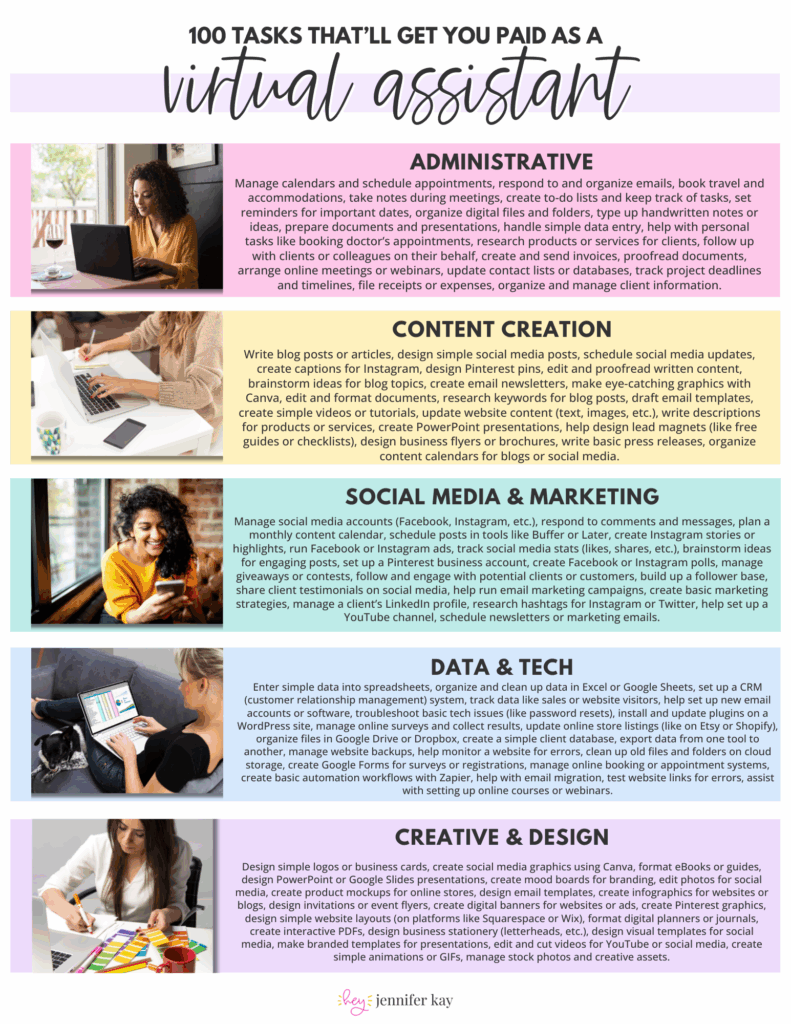
 100 Tasks VAs are Getting Paid to Do –