What does a virtual assistant do? If you’re thinking “answer emails all day,” nope. VAs handle 50+ different tasks—from social media to bookkeeping to travel planning. This post breaks down every category so you can see exactly where your skills fit in. You’ll walk away knowing which services to offer (and which ones to skip).
Table of Contents
You keep hearing about this whole “virtual assistant” thing. Maybe you’ve seen women on Instagram talking about working from home, making real money, and actually having flexibility. And you’re wondering: what does a virtual assistant do, exactly?
Because if you’re going to pivot into this career, you need to know what you’re signing up for. Is it just answering emails all day? Is it boring admin work that’ll make you want to pull your hair out? Or is there actually variety and room to use skills you already have?
Here’s the truth: Virtual assistants do way more than you think. And chances are, you already know how to do half of these tasks without realizing it!
Let’s break down exactly what virtual assistants do, organized by category, so you can see where your skills fit in.
What Is a Virtual Assistant, Really?
A virtual assistant is someone who provides remote support to business owners and entrepreneurs. You work from home (or wherever you want) and help clients with tasks they either don’t have time for, don’t want to do, or don’t know how to do.
You’re not an employee. You’re an independent contractor running your own business. You choose your clients, set your rates, and decide which services you want to offer.
The whole point? To make or save your clients money while freeing up their time to focus on what they’re actually good at. You handle the behind-the-scenes work so they can grow their business.
Simple concept. But the services you can offer? That’s where it gets interesting!
What Does a Virtual Assistant Do? The 5 Core Categories
Virtual assistant tasks fall into five main categories. You don’t have to offer all of them (please don’t try). But looking at this breakdown will help you see where your strengths and interests align!
Administrative Tasks
This is the bread and butter of VA work. Administrative tasks are the things that keep a business running but eat up massive amounts of time for busy entrepreneurs.
Manage calendars and schedule appointments. Coordinating meetings, blocking focus time, sending reminders for important dates.
Respond to and organize emails. Sorting inboxes, responding to routine messages, flagging what needs personal attention.
Book travel and accommodations. Finding flights, hotels, and rental cars. Creating detailed itineraries and handling changes when plans go sideways.
Take notes during meetings. Capturing key points, action items, and follow-ups so your client can focus on the conversation.
Create to-do lists and keep track of tasks. Using project management tools to keep everything organized and on deadline.
Organize digital files and folders. Setting up Google Drive or Dropbox structures that actually make sense.
Prepare documents and presentations. Formatting reports, creating slides, making everything look polished and professional.
Handle simple data entry. Inputting client information, updating databases, keeping records current.
Help with personal tasks. Booking doctor’s appointments, researching products, handling errands that free up your client’s time.
Research products or services. Comparing options, reading reviews, compiling recommendations.
Follow up with clients or colleagues. Sending reminder emails, checking in on pending items, keeping communication flowing.
Create and send invoices. Billing clients, tracking payments, following up on overdue invoices.
Proofread documents. Catching typos and formatting issues before anything goes out the door.
Arrange online meetings or webinars. Setting up Zoom calls, sending calendar invites, prepping tech so everything runs smoothly.
Update contact lists or databases. Keeping CRMs current, adding new leads, cleaning up old data.
Content Creation Tasks
If you can write or create content, you’re in demand. Content creation VAs help clients stay visible online without spending hours writing themselves.
Write blog posts or articles. Researching topics, drafting posts, optimizing for SEO.
Design simple social media posts. Creating graphics in Canva that stop the scroll.
Schedule social media updates. Batching content and scheduling it across platforms.
Create captions for Instagram. Writing engaging captions that match your client’s brand voice.
Design Pinterest pins. Making vertical graphics optimized for Pinterest traffic.
Edit and proofread written content. Polishing blog drafts, fixing grammar, tightening copy.
Brainstorm ideas for blog topics. Researching what their audience wants to read about.
Create email newsletters. Writing and designing newsletters that people actually open.
Make eye-catching graphics with Canva. Turning boring text into scroll-stopping visuals.
Research keywords for blog posts. Finding what people are actually searching for so content ranks.
Draft email templates. Creating reusable templates for client communication.
Create simple videos or tutorials. Recording quick how-to videos or editing existing footage.
Update website content. Swapping out old text, updating images, keeping sites current.
Write descriptions for products or services. Crafting copy that sells without sounding salesy.
Design lead magnets. Creating free guides, checklists, or PDFs that grow email lists.
Social Media & Marketing Tasks
Marketing VAs help clients stay visible and grow their audience without living on social media 24/7.
Manage social media accounts. Overseeing Facebook, Instagram, LinkedIn, or whatever platforms your client uses.
Respond to comments and messages. Engaging with followers, answering questions, building relationships.
Plan a monthly content calendar. Mapping out what to post and when so nothing falls through the cracks.
Schedule posts in tools like Buffer or Later. Batching content so it goes out consistently.
Create Instagram stories or highlights. Keeping stories fresh and organizing highlights by topic.
Run Facebook or Instagram ads. Setting up and managing paid campaigns to reach new audiences.
Track social media stats. Pulling analytics on likes, shares, and engagement to see what’s working.
Brainstorm ideas for engaging posts. Coming up with content that gets people to stop scrolling.
Set up a Pinterest business account. Getting the technical stuff configured correctly from the start.
Install and update plugins on a WordPress site. Keeping websites secure and running smoothly.
Manage online surveys and collect results. Setting up forms and organizing responses.
Update online store listings. Managing Etsy or Shopify product pages, pricing, and inventory.
Organize files in Google Drive or Dropbox. Creating folder structures that make sense and are easy to navigate.
Create a simple client database. Building systems to track leads, clients, and projects.
Manage website backups. Making sure client sites are backed up regularly.
Create Google Forms for surveys or registrations. Building forms that collect the right information.
Create basic automation workflows with Zapier. Connecting apps so tasks happen automatically.
Test website links for errors. Checking that everything on a site actually works.
Creative & Design Tasks
Creative VAs handle the visual side of a business. If you’re more design-minded than admin-focused, this is your lane.
Design simple logos or business cards. Creating brand assets that look professional.
Create social media graphics using Canva. Designing on-brand visuals that get attention.
Format eBooks or guides. Taking written content and making it look polished and readable.
Design PowerPoint or Google Slides presentations. Creating slides that don’t put people to sleep.
Create mood boards for branding. Pulling together colors, fonts, and images for brand direction.
Edit photos for social media. Touching up images so they look cohesive across platforms.
Design email templates. Creating branded email designs that clients can reuse.
Create infographics for websites or blogs. Turning data or information into visual content.
Design invitations or event flyers. Making graphics for launches, webinars, or events.
Create Pinterest graphics. Designing vertical pins optimized for Pinterest’s format.
Design simple website layouts. Using Squarespace or Wix to build clean, functional sites.
Edit and cut videos for YouTube or social media. Trimming footage, adding captions, creating reels.
Create simple animations or GIFs. Adding movement to social content to grab attention.
“But what would I even do as a VA?”
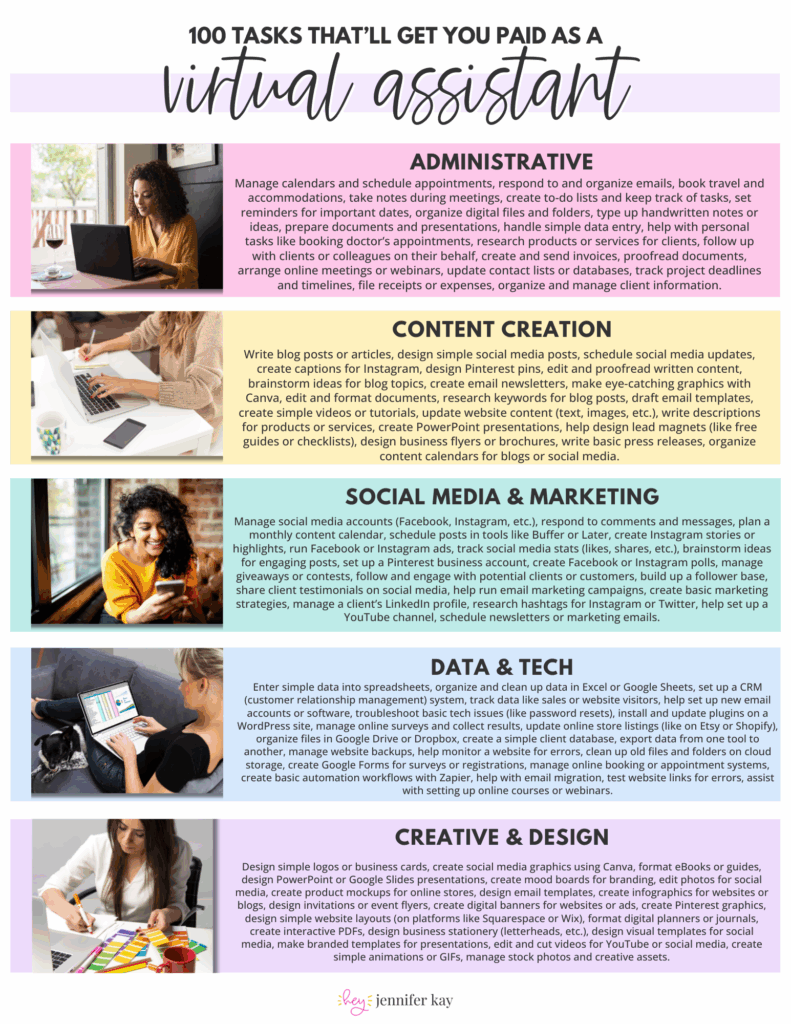
Glad you asked—here’s 100 legit tasks you could start today! No fluff, no filler. Just real-deal services clients are hiring for right now. Warning: reading this list might make you realize you’re way more qualified than you thought.
How Do You Know Which Tasks to Offer?
You don’t have to offer all 50+ of these tasks. In fact, you shouldn’t!
Start by asking yourself three questions:
1. What am I already good at? Look at your past jobs, volunteer work, or even skills you’ve picked up managing your household. If you’ve ever planned a family vacation, you can handle travel coordination. If you’ve managed a PTA Facebook group, you can do social media management.
2. What do I actually enjoy doing? Just because you can do something doesn’t mean you should offer it. If you hate graphic design, don’t force it. Pick tasks that won’t make you dread Mondays.
3. What do clients actually need? Some tasks are in higher demand than others. Email management, social media scheduling, and calendar management are always needed. Creative skills like graphic design or video editing can command higher rates.
When you’re starting out, pick 3-5 core services from one or two categories. You can always add more later as you grow.
Common Mistakes When Choosing Your VA Services
Mistake 1: Offering everything. “I can do admin, social media, graphic design, tech support, and content writing!” No. Offering everything makes you look like a beginner who doesn’t know what they’re doing. Pick a lane.
Mistake 2: Underestimating skills you already have. You don’t need a certification to manage someone’s email or schedule posts. If you’ve been doing it for yourself or in past jobs, you’re qualified.
Mistake 3: Picking services you hate. If you despise data entry, don’t offer it just because “all VAs do data entry.” You’ll burn out fast.
Mistake 4: Ignoring what’s actually in demand. Virtual assistants who can handle social media management, email marketing, or basic tech tasks are booked solid. VAs who only offer generic admin tasks? They struggle to stand out.
Ready to Start Your VA Business?
Now you know exactly what virtual assistants do—and you probably realized you already have more skills than you thought.
The next step? Figuring out how to package those skills, price them, and actually land your first client. That’s where most people get stuck. They know they can do the work, but they don’t know how to turn it into a legit business.
That’s exactly what I help you do with the 14-Days to VA Roadmap. It’s a step-by-step roadmap that walks you through everything from choosing your services to pitching your first client – no fluff, no guessing, just the exact plan I followed to build my own VA business!!
You're 14 Days Away from Launching Your VA Business
Stop wondering if you can be a virtual assistant and start taking action!
This roadmap breaks down everything you need into bite-sized daily tasks so you can finally get your business off the ground.
Think email marketing is outdated? Think again. Building an email list is one of the most powerful ways to land consistent VA clients without chasing them on social media. This post breaks down exactly how to start, grow, and use your email list to fill your calendar with dream clients!
Pitching yourself as a virtual assistant shouldn’t feel gross or pushy. But if you’re staring at a blank email wondering how to sound professional without sounding like a used car salesman, you’re not alone. This post gives you the exact framework (and copy-paste templates) to pitch your VA services confidently—without the ick factor!
Struggling to keep track of client projects, deadlines, and your own to-do list? You need a project management tool that actually works for VA life. This post breaks down the best options (ClickUp, Asana, Trello, Monday.com, and more), what each one does well, and how to pick the right one for your business.
Wondering where to find virtual assistant clients when you’re just starting out? Forget job boards that pay $5/hour. This post breaks down 5 real places to find quality clients who actually pay what you’re worth—from Facebook groups to warm outreach. You’ll walk away with a game plan to land your first (or next) client!
Tired of competing on price as a general VA? Specializing as a virtual assistant lets you charge package rates, attract better clients, and actually scale your business. This post breaks down the best specializations to consider, how to learn the skills, and how to position yourself as an expert—even if you’re brand new!
Is being a virtual assistant worth it? If you want flexibility and real income without leaving your house, yes. But it’s not all laptop-on-the-beach vibes. This post breaks down the honest pros, the real cons, and who this career is (and isn’t) perfect for. You’ll walk away knowing if the VA life is your next move.
 100 Tasks VAs are Getting Paid to Do –