Think email marketing is outdated? Think again. Building an email list is one of the most powerful ways to land consistent VA clients without chasing them on social media. This post breaks down exactly how to start, grow, and use your email list to fill your calendar with dream clients.
Table of Contents
Let me guess: you’re showing up on Instagram every day, posting in Facebook groups, trying to get noticed on LinkedIn, and you’re exhausted.
You’re putting in all this effort on social media, but when you need a client, you’re starting from scratch every single time. You’re at the mercy of the algorithm. You’re hoping someone sees your post at the exact moment they need a VA.
Here’s what nobody tells you: email marketing for virtual assistants is one of the most powerful ways to land consistent clients without chasing them all over social media.
When you have an email list, you own the relationship. You’re not competing with a million other posts in someone’s feed. You’re showing up directly in their inbox, staying top of mind, and building trust over time so that when they’re ready to hire, you’re the first person they think of.
In this post, I’m walking you through exactly how to build an email list, what to send, and how to turn subscribers into paying clients.
Why Email Marketing for Virtual Assistants Actually Works
I know what you’re thinking. “Email? Isn’t that outdated? Don’t people just delete everything?”
Nope. Email marketing is still one of the highest-converting marketing channels out there. Here’s why it works so well for VAs:
You own your list. Instagram can shut down your account tomorrow. Facebook can change the algorithm. But your email list? That’s yours forever.
People check their email every day. Your ideal clients are already in their inbox multiple times a day. You’re just showing up where they already are.
It builds trust over time. When someone reads your emails week after week, they start to feel like they know you. That makes it so much easier to hire you when they’re ready.
You can sell without being salesy. Email lets you share value, tell stories, and offer your services in a way that feels natural and helpful, not pushy.
It brings in clients on autopilot. Once you set up your welcome sequence and start sending regular emails, you can land clients without actively pitching anyone.
I’ve landed clients from people who were on my email list for months before they ever replied or reached out. They were reading my emails, learning from me, and when they were ready to hire a VA, I was the obvious choice.
The Biggest Email Marketing Myths (And Why They’re Wrong)
Let’s clear up some misconceptions before we dive in:
Myth #1: “I need thousands of subscribers before email marketing is worth it.” Wrong. I’ve made money from an email list of 50 people. Quality over quantity. A small, engaged list of your ideal clients is way more valuable than 5,000 random people who don’t care.
Myth #2: “People don’t read emails anymore.” They do. They just don’t read boring, spammy emails. If your emails are valuable, personal, and helpful, people will read them.
Myth #3: “I don’t have time to send emails every week.” You don’t need to send daily emails. Once a week is plenty. And once you have a rhythm, it takes 30 minutes max.
Myth #4: “Email marketing is too complicated.” It’s not. You need an email platform, a lead magnet, and a plan. That’s it. I’ll walk you through the whole thing in this post.
Step 1: Choose Your Email Marketing Platform
First things first: you need a place to collect and send emails. Here are the best platforms for virtual assistants:
Kit (my recommendation) Pricing: Free up to 1,000 subscribers, then $9/month. Why I love it: It’s designed for creators and small business owners. Easy to use, great automation features, and super clean landing pages for your lead magnets. Best for: VAs who want a simple, powerful platform that grows with them.
Mailchimp Pricing: Free up to 500 subscribers, then $13/month. Why it’s popular: It’s been around forever and has tons of templates. Best for: Beginners who want a free option to start.
Flodesk Pricing: $38/month (flat rate, unlimited subscribers). Why it’s beautiful: Gorgeous email templates that look like they came from a designer. Best for: VAs who want their emails to look stunning without any design skills.
My advice: Start with Kit or Mailchimp on the free plan. Once you hit 500-1,000 subscribers, upgrade or switch based on what you need.
Step 2: Create a Lead Magnet That Attracts Your Ideal Clients
A lead magnet is a free resource you give away in exchange for someone’s email address. It’s how you get people on your list in the first place.
Your lead magnet should solve a specific problem for your ideal client. Think about what they’re struggling with and create something that helps them right now.
Great lead magnet ideas for VAs:
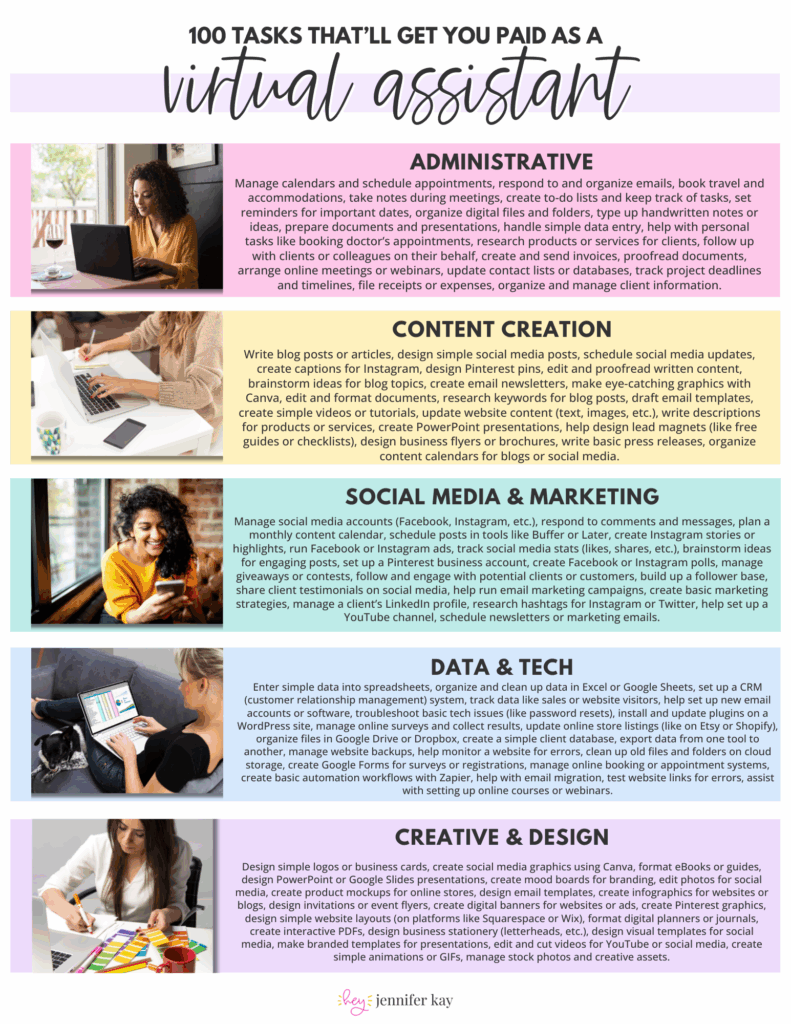
“100 Tasks You Can Outsource to a VA” (for business owners who don’t know what VAs can do)
“The Ultimate VA Hiring Checklist” (for people ready to hire but not sure where to start)
“5-Day Email Audit Challenge” (for people drowning in their inbox)
“Social Media Content Calendar Template” (for coaches or course creators who need help with content)
“Client Onboarding Checklist” (for service providers who need systems help)
Format options:
PDF checklist (super easy to create in Canva)
Google Sheet or Notion template
Email challenge (5-7 days of tips delivered via email)
Short video training (10-15 minutes)
Pro tip: Your lead magnet doesn’t have to be fancy. A simple one-page PDF checklist works great. Just make sure it’s actually helpful and solves a real problem.
Step 3: Set Up Your Welcome Sequence
When someone signs up for your lead magnet, don’t just send them the download link and ghost them. Set up an automated welcome sequence that nurtures them and positions you as the solution to their problems.
Here’s a simple 5-email welcome sequence:
Email 1 (Day 0): Welcome + Deliver the Lead Magnet Thank them for signing up, deliver the lead magnet, and tell them what to expect from your emails.
Email 2 (Day 1): Your Story Share why you became a VA and who you help. Make it personal and relatable.
Email 3 (Day 3): How You Can Help Talk about the services you offer and the problems you solve. Include a link to your services page or a calendar link to book a call.
Email 4 (Day 5): Social Proof Share a client testimonial or case study. Show them what’s possible when they work with you.
Email 5 (Day 7): Next Steps Give them a clear call to action. This could be booking a discovery call, checking out your services, or replying to your email to start a conversation.
After the welcome sequence, they’ll move to your regular weekly emails.
Step 4: Grow Your Email List
Now that you have your platform, lead magnet, and welcome sequence set up, it’s time to actually get people on your list.
Add an Opt-In to Your Website
If you have a website, add your lead magnet opt-in form everywhere:
In your website header or navigation bar
At the end of every blog post
In a pop-up (but don’t be annoying about it)
On a dedicated landing page
Promote on Social Media
Share your lead magnet on Instagram, Facebook, LinkedIn, and TikTok. Post about it regularly and include a link in your bio.
Example Instagram caption: “Feeling overwhelmed by your inbox? I created a free guide with 10 inbox management hacks that’ll help you get to inbox zero (and stay there). Grab it at the link in my bio!”
Use Facebook Groups Strategically
Join Facebook groups where your ideal clients hang out. When people ask questions related to your lead magnet, offer it as a helpful resource (but only if the group rules allow it).
Example comment: “I actually created a free checklist on this exact topic! It walks through 100 tasks you can outsource to a VA. I’ll DM you the link if you’re interested!”
Network and Collect Emails in Real Life
Going to a networking event? Mention your lead magnet in conversations and collect business cards. Follow up with an email offering to send them your freebie.
Step 5: Send Regular Emails (Yes, Really)
This is where most people drop the ball. They set up their email list, send the welcome sequence, and then… nothing.
Here’s the truth: your email list only works if you actually email them.
I recommend sending one email per week. That’s it. Not daily. Not multiple times a week. Just one consistent email every week.
Pick a day (I like Mondays or Thursdays) and stick to it. Your subscribers will get used to hearing from you on that day, and they’ll start to look forward to your emails.
What to Write in Your Emails
If you’re staring at a blank screen thinking “What do I even say?”, here are some easy email ideas:
Share a tip or how-to. Teach them something useful related to what you do. (Example: “3 ways to organize your inbox so you never miss an important email”)
Tell a story. Share a client win, a lesson you learned, or a behind-the-scenes moment from your business.
Answer a common question. What do people always ask you about being a VA? Answer it in an email.
Share a resource. Recommend a tool, podcast, or article you’ve been loving lately.
Make an offer. Every 3-4 weeks, send an email where you pitch your services or promote a special offer.
The goal is to provide value, stay top of mind, and build trust. You’re not selling in every email. You’re just showing up consistently and being helpful.
Templates and Examples
Here are some copy-paste email templates you can customize:
Welcome Email Template
Subject: Your [Lead Magnet Name] is here!
Hi [First Name]!
Thanks so much for downloading [Lead Magnet Name]! I’m excited to have you here.
You can grab your [checklist/guide/template] right here: [Download Link]
Quick intro: I’m [Your Name], a virtual assistant who helps [your niche] with [specific services]. I know how overwhelming [pain point] can be, so I created [lead magnet] to help you get started.
Over the next few days, I’ll be sending you a few emails with tips, resources, and stories about [topic]. If you ever have questions or want to chat about working together, just hit reply!
Talk soon, [Your Name]
Weekly Value Email Template
Subject: [Helpful tip or question]
Hey [First Name],
[Short story or intro that relates to the tip you’re sharing]
Here’s the thing I want to share with you today: [Main tip or lesson]
[Explain the tip in 2-3 short paragraphs with actionable steps]
Try this out and let me know how it goes!
[Your Name]
P.S. If you need help with [service you offer], I have availability starting [date]. Reply to this email and let’s chat!
Sales Email Template
Subject: I have 2 spots opening up next month
Hey [First Name],
Quick heads up: I’m opening up 2 new client spots starting [date], and I wanted to give you first dibs before I announce it publicly.
If you’ve been thinking about getting support with [pain point your service solves], now’s a great time. Here’s what I can help with:
[Bullet point list of services]
Right now, my clients are seeing [specific result or benefit]. If that sounds like what you need, let’s hop on a quick call to see if we’re a good fit.
Grab a time here: [Calendar Link]
Talk soon! [Your Name]
Common Mistakes and Fixes
Mistake #1: Waiting until you have a “big” list to start emailing. Fix: Start emailing when you have 10 people on your list. The sooner you start, the sooner you build the habit and get comfortable with it.
Mistake #2: Only emailing when you have something to sell. Fix: Email consistently, even when you’re not selling. Build the relationship first. Then when you do pitch, people will actually pay attention.
Mistake #3: Making your emails all about you. Fix: Focus on your reader. What do they need? What problems are they facing? How can you help? Your emails should feel like you’re talking to a friend, not broadcasting to a crowd.
Mistake #4: Using a generic “no-reply” email address. Fix: Use a real email address (like [email protected]) so people can actually reply to you. Some of my best client conversations started from someone hitting reply to my email.
Mistake #5: Not tracking what works. Fix: Pay attention to your open rates and click rates. Which subject lines get more opens? Which emails get replies? Do more of what works.
Next Steps
Here’s exactly what to do right now:
Step 1: Sign up for Kit or Mailchimp (free plan is fine).
Step 2: Create a simple lead magnet (start with a one-page PDF checklist in Canva).
Step 3: Set up your opt-in form and landing page.
Step 4: Write your 5-email welcome sequence and set it to automate.
Step 5: Start promoting your lead magnet on social media and in conversations.
Step 6: Pick a day of the week and commit to sending one email every week.
Email marketing isn’t complicated. You just need to start. Set up your list, send your first email, and keep showing up consistently. That’s it.
And trust me, six months from now when a client replies to your email saying “I’ve been reading your emails for months and I’m ready to hire you,” you’ll be so glad you started today!!
Share This Post:
Email
Facebook
Pinterest
Twitter
You might also like...
Think email marketing is outdated? Think again. Building an email list is one of the most powerful ways to land consistent VA clients without chasing them on social media. This post breaks down exactly how to start, grow, and use your email list to fill your calendar with dream clients!
Pitching yourself as a virtual assistant shouldn’t feel gross or pushy. But if you’re staring at a blank email wondering how to sound professional without sounding like a used car salesman, you’re not alone. This post gives you the exact framework (and copy-paste templates) to pitch your VA services confidently—without the ick factor!
Struggling to keep track of client projects, deadlines, and your own to-do list? You need a project management tool that actually works for VA life. This post breaks down the best options (ClickUp, Asana, Trello, Monday.com, and more), what each one does well, and how to pick the right one for your business.
Wondering where to find virtual assistant clients when you’re just starting out? Forget job boards that pay $5/hour. This post breaks down 5 real places to find quality clients who actually pay what you’re worth—from Facebook groups to warm outreach. You’ll walk away with a game plan to land your first (or next) client!
Tired of competing on price as a general VA? Specializing as a virtual assistant lets you charge package rates, attract better clients, and actually scale your business. This post breaks down the best specializations to consider, how to learn the skills, and how to position yourself as an expert—even if you’re brand new!
Is being a virtual assistant worth it? If you want flexibility and real income without leaving your house, yes. But it’s not all laptop-on-the-beach vibes. This post breaks down the honest pros, the real cons, and who this career is (and isn’t) perfect for. You’ll walk away knowing if the VA life is your next move.
 100 Tasks VAs are Getting Paid to Do –